


Save and edit your clipboard content as a note file
plain Markdown files with no database and no lock-in**
Tp-Note is a versatile note-taking tool designed for both desktop and console environments. It allows users to create, edit, and manage notes efficiently. Tp-Note is designed to bridge the gap between unstructured clipboard data and organized, local file storage. It is primarily built in Rust and follows a “file-centric” philosophy where the filename itself acts as a synchronized piece of metadata. This tool is ideal for users looking for a simple yet powerful way to manage their notes across different platforms.
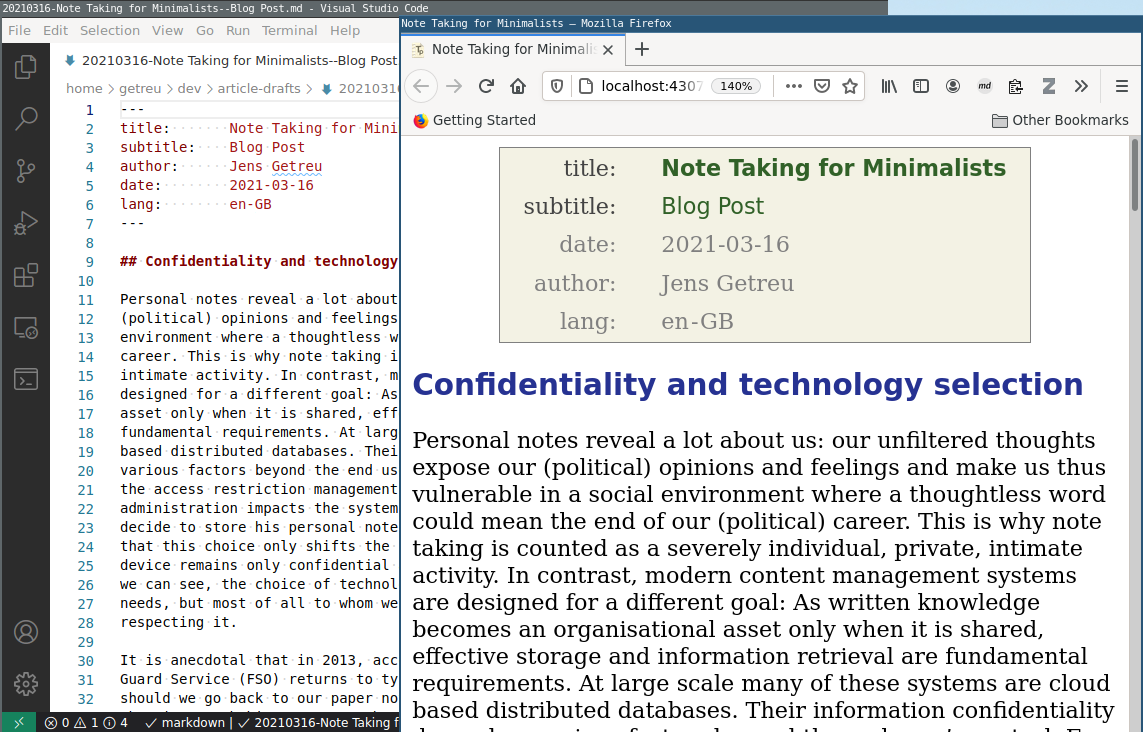
A more sophisticated example using the “Zettelkasten” scheme:
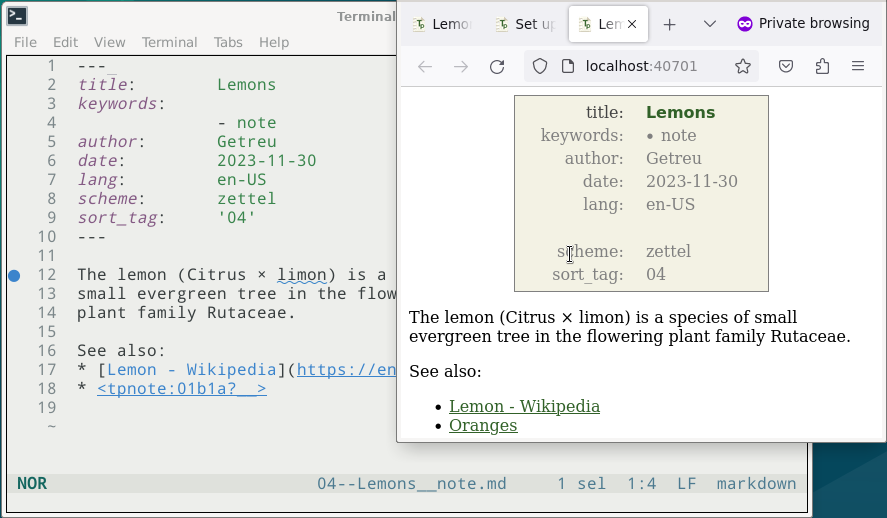
Clipboard Integration: Tp-Note can save and edit clipboard content as note files, making it easy to capture information quickly.
Template System: It uses customizable templates to synchronize note metadata with filenames, enhancing organization.
Markdown Support: Users can convert HTML content to Markdown. Notes are rendered from Markdown to HTML when viewed with Tp-Note’s internal web server.
Plain Markdown Viewer/Editor: Tp-Note can open,
view, and edit any plain Markdown file — even without a YAML front
matter header — without modifying it. Use --add-header to
additionally prepend a YAML header and convert the file into a full
Tp-Note note.
File Management: Notes can be created from existing files or directories, and users can easily navigate and edit their notes.
| Action | Command Example |
|---|---|
| Create a note from clipboard | tpnote (when clipboard contains text) |
| Convert HTML to Markdown | curl https://example.com | tpnote |
| View a plain Markdown file | tpnote --view myfile.md |
| Edit a plain Markdown file | tpnote myfile.md |
| Convert plain Markdown to Tp-Note | tpnote --add-header myfile.md |
| Edit an existing Tp-Note file | tpnote ./path/to/note.md |
| Generate PDF from a note | tpnote -x - note.md |
weasyprint - note.pdf |
On Tue, 2023-12-19 at 12:58 +1100, Dev Rain wrote:
Found Tp-Note awhile back and it has become part of my daily workflow, and indeed part of my daily note-taking life. I wanted to extend my thanks; so thank you. dev.rain
Read more in Tp-Note’s user manual, Download Tp-Note or visit the project page: Tp-Note - Minimalistic note-taking.
User documentation:
Introductory video
Project page:
Tp-Note’s project page, which you are reading right now, lists where you can download Tp-Note and gives an overview of Tp-Note’s resources and documentation.
User manual:
The user manual showcases how to best use use Tp-Note and how to integrate it with your file manager.
Unix man-page:
The Unix man-page is Tp-Note’s technical reference. Here you learn how to customize Tp-Note’s templates and how to change its default settings.
Developer documentation:
API documentation
Tp-Note’s program code documentation targets mainly software developers. The code is split into a library tpnote-lib and the command line application tpnote. The advanced user may consult the Tp-Note’s config module documentation and the constants in the API documentation which explain the various settings. Most of them can be customized through Tp-Note’s configuration file.
Repository:
All precompiled binaries, installer packages and the documentation are published on the GitHub releases page — the single official download location:
Open the latest
release and download the asset for your platform from its
Assets list. Every release provides the following files
(<version> is the release number,
e.g. 1.27.3):
| Asset | Platform / use |
|---|---|
tpnote-<version>-x64.msi |
Windows installer (recommended on Windows) |
tpnote_<version>_amd64.deb |
Debian / Ubuntu installer (x86-64) |
tpnote-<version>-x86_64-unknown-linux-gnu.tar.gz |
Linux x86-64 (glibc), standalone binary |
tpnote-<version>-x86_64-unknown-linux-musl.tar.gz |
Linux x86-64, static (musl) — headless/console/servers |
tpnote-<version>-aarch64-unknown-linux-gnu.tar.gz |
Linux ARM64 / Raspberry Pi 64-bit |
tpnote-<version>-armv7-unknown-linux-gnueabihf.tar.gz |
Linux ARMv7 / Raspberry Pi 32-bit |
tpnote-<version>-x86_64-pc-windows-gnu.zip |
Windows x86-64, standalone binary |
tpnote-<version>-x86_64-apple-darwin.tar.gz |
macOS (Intel) |
tpnote-<version>-aarch64-apple-darwin.tar.gz |
macOS (Apple Silicon) |
tpnote-<version>-docs.tar.gz |
User manual and man page (HTML, PDF, man) |
tpnote-<version>-winget-manifests.tar.gz |
winget manifests (Windows Package Manager) |
Each .tar.gz / .zip archive contains a
single, stripped tpnote executable; the .deb
and .msi are installer packages.
Download and run tpnote-<version>-x64.msi from the
latest
release.
As this early version of the Windows installer is not signed yet, Windows will show the error message “Windows protected your PC”. As a work-around, when you click on the link “More info”, a ”Run anyway” button will appear allowing you to continue the installation process. In general, regardless of where a program comes from, I recommend checking every installable file with VirusTotal.
Once installation is complete, right-click on the Desktop and select “Show more options” to find the “New Tp-Note” entry in the menu.
Download tpnote_<version>_amd64.deb from the latest
release and install it:
sudo dpkg -i tpnote_<version>_amd64.debPrefer a bare executable? From the latest
release, download the .tar.gz (Linux/macOS) or
.zip (Windows) archive for your target (see the table
above), unpack the single tpnote binary and place it on
your PATH (see the Installation
section below).
Tp-Note is also available through the Windows Package Manager. To install:
winget install -e --id getreu.tpnoteFollowing installation, right-click the Desktop and click “Show more options” to reveal the “New Tp-Note” context menu entry.
An official package is available on NixOS:
environment.systemPackages = [ pkgs.tpnote ];First install the Nix package manager available for Linux, MacOS and Windows (WSL2). Alternatively, for Linux there are also prebuilt Deb/Pacman/Rpm Nix installers available.
Once you have the Nix package manager installed on your system, try out Tp-Note with:
nix-shell -p tpnoteor follow installation instructions here: NixOS packages - tpnote
The Unix man page ships inside
tpnote-<version>-docs.tar.gz (see the latest
release); unpack it and copy to
/usr/local/share/man/man1.
Copy Tp-Note’s icon to /usr/local/share/icons/:
Tp-Note can be installed via a Windows installer package or by placing the binary directly on your desktop for easy access. It is recommended to integrate it into your file manager’s context menu for convenience.
Depending on the availability of installer packages for your
operating system, the installation process is more or less automated.
For Windows users the fully automated installer
tpnote-<version>-x64.msi is available on the latest
release. After installation, click right on the desktop and select
“Show more options”, then “New Tp-Note” to get started. For more
information, please consult the Distribution
section above and the Installation
section in Tp-Note’s manual.
This section only applies to you if you have overwritten some of Tp-Note’s internal default configuration values with a custom configuration file. Learn more about how the configuration is merged from different file locations in the Customization section of Tp-Note’s manual page.
While upgrading Tp-Note, new features may cause a change in Tp-Note’s configuration file structure. If one of your configuration files becomes incompatible, Tp-Note does not abort: it skips that one file, logs an error, and continues with the rest of the merged configuration (falling back to the built-in default for whatever the skipped file used to override), e.g.:
*** ERROR:
Ignoring configuration file:
---
"/home/joe/.config/tpnote/tpnote.toml"

invalid length 3, expected fewer elements in array in `viewer.served_mime_types`
The note file is still processed normally, but Tp-Note exits with
status 5 instead of 0, so that scripts calling
Tp-Note can detect the condition. If Tp-Note sources more than one
configuration file, consider the possibility of syntax errors in any of
these files (cf. Customization
section of Tp-Note’s man-page). Fix the reported file, or delete it
to fall back to the built-in defaults.
If the above precompiled binaries do not suite you, you can compile Tp-Note yourself.
Download, compile and install Tp-Note:
Building on Linux
cargo install tpnote
sudo cp ~/.cargo/bin/tpnote /usr/local/bin
# Download icon
cd /usr/local/share/icons
sudo wget https://blog.getreu.net/projects/tp-note/assets/tpnote.svg
On Linux, Tp-Note displays errors and debug messages as notifications. This requires a Linux/BSD based desktop environment that follows the XDG specification, e.g. KDE, Gnome, XFCE, LXDC, Mate (and most others).1
Recommended Linux console and server version
The full-featured version of Tp-Note depends on GUI
libraries like Xlib which might not be available on a headless system.
Either download the Musl archive
tpnote-<version>-x86_64-unknown-linux-musl.tar.gz
from the latest
release or compile Tp-Note yourself without default
features:
cargo install --no-default-features \
  --features lang-detection,renderer,mermaid,latex tpnote
sudo cp ~/.cargo/bin/tpnote /usr/local/bin
If Tp-Note’s binary size if of concern, omit the
lang-detection feature in the cargo invocation
above. The lang-detection feature causes 95% of the final
binary size because of its extensive language models.
Building on Windows and macOS
Build the full-featured version2 with:
cargo install tpnoteTp-Note supports cross-compilation for multiple architectures. There
are two independent ways to do this: with the standard Rust toolchain
(rustup + cargo), or with Nix, if you already
work in a Nix/NixOS environment. Pick one — they are not meant to be
mixed.
The project includes pre-configured cross-compilation settings in
.cargo/config.toml. This is the recommended path if you are
not using Nix.
Building for Debian/Ubuntu, including Raspberry Pi (Recommended)
Install the cross-compiler toolchains:
sudo apt update
sudo apt install crossbuild-essential-armhf crossbuild-essential-arm64
Build for Raspberry Pi 32-bit (ARMv7):
rustup target add armv7-unknown-linux-gnueabihf
cargo build --release --target armv7-unknown-linux-gnueabihf
The binary will be at:
target/armv7-unknown-linux-gnueabihf/release/tpnote
Build for Raspberry Pi 64-bit (ARM64):
rustup target add aarch64-unknown-linux-gnu
cargo build --release --target aarch64-unknown-linux-gnu
The binary will be at:
target/aarch64-unknown-linux-gnu/release/tpnote
Building for Musl Linux (static)
For a fully static binary that works on any Linux distribution:
rustup target add x86_64-unknown-linux-musl
sudo apt install musl-tools
cargo build --release --target x86_64-unknown-linux-musl
Building for Windows
rustup target add x86_64-pc-windows-gnu
sudo apt install binutils-mingw-w64 mingw-w64
cargo build --release --target x86_64-pc-windows-gnuThe recommended way on NixOS, instead of
rustup/cargo above, is to use the Nix flake.
The flake offers separate targets for standard Linux and for NixOS
itself — see the comments at the top of flake.nix for the
full compatibility matrix and rationale.
Building for standard Linux (glibc, portable binary)
— architectures: x86_64, armv7 (Raspberry Pi
32-bit), aarch64 (Raspberry Pi 64-bit / ARM servers).
Compatible with Debian 11+, Ubuntu 20.04+, Raspberry Pi OS:
# Build for x86_64
nix build .#tpnote-x86_64-unknown-linux-gnu

# Build for ARMv7 (32-bit) for Raspberry Pi
nix build .#tpnote-armv7-unknown-linux-gnueabihf

# Build for ARM64 (64-bit) for Raspberry Pi and ARM servers
nix build .#tpnote-aarch64-unknown-linux-gnu

# Build the Debian package (for x86_64 only)
nix build .#tpnote-deb
Building for NixOS (native Nix-store binary) —
architecture: x86_64. Runs via
nix run/nix build on NixOS (or any host with
access to the same Nix store), but will not run if copied to a system
without that store:
nix buildBuilding a static and portable (musl) binary —
architecture: x86_64. Fully static, no dynamic interpreter
at all: runs unmodified on both NixOS and any standard Linux
distribution:
nix build .#tpnote-x86_64-unknown-linux-muslBuilding for Windows — architecture:
x86_64:
nix build .#tpnote-x86_64-pc-windows-gnuTo also package the binary as a Windows installer
(.msi), use
scripts/18-make-win-msi-package.nu, which builds the binary
above and then packages it via the wix/ flake’s dev shell
(WiX Toolset running under Wine). Unlike the nix build
commands above, this does not produce ./result; it writes
the finished installer to
build/tpnote-<version>-x64.msi:
nu scripts/18-make-win-msi-package.nuThe nix build commands above put their binaries in the
Nix store, symlinked as ./result. Copy them to your desired
location:
cp result/bin/tpnote* /path/to/destinationThis project follows Semantic Versioning.
Author:
Copyright:
In case an XDG desktop environment is not available, you
can opt out notifications and message boxes by omitting the
message-box feature by adding
--no-default-features --features lang-detection,read-clipboard,renderer,viewer,mermaid,latex
to cargo install tpnote. Now, all error messages are dumped
on the console from where you started Tp-Note into
stderr.↩︎
When building for Windows or macOS, it does not make
sense to exclude the message-box feature, because - under
Windows and macOS - it does not rely on the notification library.
Instead, it uses direct OS-API calls for popping up alert boxes. As
these calls have no footprint in binary size or speed, always keep the
message-box feature compiled in.↩︎
